How to join a Zoom meeting from your Tesla
To join a Zoom meeting from a parked Tesla, use Tesla's own Zoom app, or open Zoom's web client in the car's browser. CabinWork is a free app that puts today's Zoom meetings on the car's screen with a Join button, so you never type a meeting link on the car's keyboard.
Display is $4.99 a month or $29.99 a year in the US, with a 7-day free trial for new subscribers, bought in CabinWork for iPhone.
Download on the App StoreDownload for Mac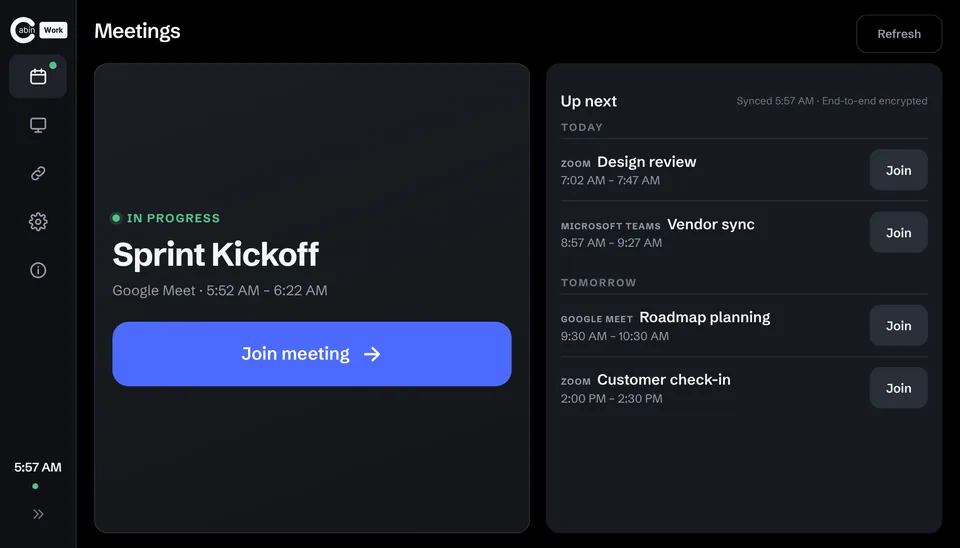
Parked use only. CabinWork is for a parked car. Never use video, meetings or the screen while driving.
Option 1: Tesla's Zoom app
Tesla has a Zoom app in the car's app launcher. It uses the cabin camera and works while the car is parked. It handles Zoom only, and you find or enter your meeting inside that app.
Option 2: Zoom in the car's browser
Zoom meetings can also be joined in a web browser, without the app. Zoom calls this the Zoom Web App: nothing is installed, and a guest joins with the meeting link, or with the meeting ID and passcode (Zoom's guide to the Web App).
Tesla's software from 2026.26 lets websites ask for the cabin camera and microphone while the car is parked, on cars with the AMD Ryzen computer (reported by Not a Tesla App). The car asks you to approve each request on screen. To see which computer your car has, open Controls, Software, Additional Vehicle Information on the car's screen.
The hard part is getting the link into the car. That is what CabinWork does.
How CabinWork lines up your Zoom links
- In the car's browser, open cabinwork.app. It shows a code and two words. The code lasts 10 minutes, and New code gives a fresh one.
- Scan the code with your iPhone and get CabinWork for iPhone. Check the two words match, then connect and allow calendar access.
- Your video meetings for the next 7 days appear on the car's screen. Tap Join, and a Zoom link opens in Zoom's web client.
You pair once. Meetings from Google Meet, Microsoft Teams and Webex sit in the same list, so one screen covers a mixed day.
What the car's screen shows
- The next 7 days. Only events with a video link are listed: Google Meet, Zoom, Microsoft Teams and Webex. A dentist appointment stays on your phone.
- The next meeting first. It sits at the top with a large Join button, so one tap is enough when you park two minutes before the hour.
- It keeps itself current. Your iPhone sends changes in the background. A meeting that moves shows its new time in the car, and Refresh on the car's screen asks for the list straight away.
- You choose how much is sent. In the iPhone app you can hide meeting titles, send today only, or leave out invitations you have not answered.
- A link that is not in your calendar. Choose Join by link on the car's screen and paste or type the meeting link.
Which option to use
| Tesla's Zoom app | Zoom in the browser, with CabinWork | |
|---|---|---|
| Finding the meeting | Inside the app | Already listed from your calendar, one tap |
| Other providers | Zoom only | Meet, Teams and Webex in the same list |
| Which cars | Cars that have the app | Camera and microphone need recent software and the AMD Ryzen computer |
| Cost | Part of the car | Free |
Before a call that matters
- CabinWork has a camera and microphone test on the car's screen. Run it once so the car's permission prompts are out of the way.
- The car's browser needs the car to be online: Tesla's Premium Connectivity, or Wi-Fi such as your phone's hotspot.
- The cabin camera is aimed at the driver's seat.
- Some company Zoom accounts still carry an older setting that blocks joining from a browser. Zoom says only a small number of accounts have it. If your meeting will not open in the browser, that is the likely cause, and Tesla's Zoom app is the way in.
- We have joined Zoom calls from our Model Y, with the cabin camera working while the car was in Park. Which features Zoom's web client offers in the car's browser is up to Zoom, so join a test meeting first.
If a meeting does not show
- Check the event has a video link. An event with only a room or a phone number is not listed.
- The calendar has to be on your iPhone. If you only sign in inside another calendar app, add the account under Settings, Apps, Calendar, Calendar Accounts (Apple's guide to calendars on iPhone).
- Open CabinWork on the phone once to sync, then tap Refresh in the car.
- iOS does not wake an app that was swiped away in the app switcher. Leave CabinWork in the background, with Background App Refresh on and Low Power Mode off.
When you are done
- The car's browser plays video only in Park. Finish the call before you move the car.
- To take the same meeting on your phone, with its camera and microphone, use Join from this phone in the iPhone app.
- In a car you share, choose Disconnect and clear this screen under Setup. The meeting list stays on that screen until you do.
Questions
Does it work while driving?
No. CabinWork is for a parked car, and the car's camera is only available to websites while parked.
Does it cost anything?
No. Meetings in CabinWork is free and stays free, with no ads. Zoom's own plans and limits still apply to the meeting.
Does CabinWork see my meeting?
No. CabinWork opens Zoom's own site, and Zoom runs the call. From version 1.2, the meeting list itself is encrypted between your phone and the car. The privacy page says what is stored.
Which Teslas?
The meeting list works in the car's web browser. Camera and microphone in the browser need a recent software version and the AMD Ryzen computer; on other cars, use Tesla's Zoom app. To see which computer your car has, open Controls, Software, Additional Vehicle Information on the car's screen.
Do I need a Zoom account?
That is the host's choice. Zoom lets a guest join in the browser with the link, or the meeting ID and passcode, unless the host requires sign-in.
Sources
- Getting started with the Zoom Web App, Zoom. Joining a meeting in a browser without installing anything, and the older account setting that blocks it.
- Set up multiple calendars on iPhone, Apple. Adding a work or personal calendar account to the iPhone.
- Tesla adds camera support to the browser in the 2026.26 update, Not a Tesla App. The report that websites may use the cabin camera and microphone while parked. This one is a news report, not Tesla's own page.
Display is $4.99 a month or $29.99 a year in the US, with a 7-day free trial for new subscribers, bought in CabinWork for iPhone.
Download on the App StoreDownload for Mac